Showing posts with label julian date. Show all posts

Wednesday, 9 February 2011

Week 20 - User Interaction

Following a short break, it's back to work on the Honours Project. I'm aiming to have the program fully finished by the end of February, the features I'm aiming to improve/add are:

  • More user interaction. This has been partly addressed this week.
  • Improve lighting and shadows. Currently the planets don't have a 'dark side' where the Suns light doesn't hit them. I've no idea why this is as the lights are set up in the centre of the Sun, so I may not be able to solve this.
  • Implement pop up menus. All the user interaction is keyboard and mouse based at the moment, and there's too many functions going on to have them all implemented by a key press - I want to move some stuff over to menus, and also include a pop up with control details for the keyboard functions.
  • Rotate planets as they orbit. Currently the planets aren't rotating as they move, and implementing this has proved more difficult than I first thought it would be.
  • Improve movement controls. This is the least important update, so it may get cast aside if I run out of time, but I would like to improve the way the user moves around the 3D solar system - it's not brilliant but it works, so I wouldn't be too worried about leaving it if need be.

So onto the improvements in the user interaction that have been added this week. The major cosmetic change is the addition of a speed control. I had previously attempted to add this in using a variable called speedFactor which was adjusted everytime the user pressed a key - but could not get it to work. I solved this by moving the code which updates the julian date:


   julDate += (0.1 * speedFactor);

from the updateMercPosition function that it was in, into the main myDrawGLScene method, which fixed the issue of the speedFactor variable not being updated by a user key press. Now whenever the user presses 'm' the speed is increased (to a maximum of 25x), with n decreasing the speed (minimum of 1x). The program launches in 1x speed, and can be increased by the user to 25 times the launch speed. The speed is displayed on screen, beneath the two date displays like so:


The second piece of functionality that has been added is the ability for the user to increase the size of the individual planets. This was something discussed in my last meeting with Rob, and I decided that in order for the user to get a good look at the models (especially the smaller inner four planets) without lots of zooming and panning, this would be a great feature to implement. At the moment, only the planet Earth has this fucntionality coded, and it is controlled by the 'u' (to increase size to a max of 8x the original) and 'i' (to decrease size) keys. This is a feature I intend to move to the menu system, simply for the reason that I will run out of keyboard keys if I use two per planet. In order to code this, I introduced a variable earthSize, which is controlled in a similar way to the speed variable, increasing or decreasing the variable on a key press. I had to move the scaling function for the model from InitGL, where it was located in the display list, into myDrawGLScene, in order for it to update correctly whilst the program is running.


The final piece of functionality that I added this week was scaling the distances from the Sun. There are two options for the user in this case - they can increase/decrease the distance of the inner four planets from the Sun (currently using the 'f' and 'g' keys) or increase/decrease the distance of the outer four planets from the Sun. This gives the user the option to see the planets bunched in much more closely than the correct scale that the program launches in. This is controlled by two variables - innerScale and outerScale, with a default setting of 16 (purely for aesthetic reasons, although this could change). The positions of the planets that are defined in earth Update..Position method are multiplied by these variables, which are increased or decreased by a key press. The increase value for both variables is limited to 20, whilst different limits are applied for the inner and outer decrease values - in the inner case, so Mercury does not disappear into the Sun model, and in the outer case, so Jupiter and Mars' orbits don't collide.
The image below shows the outer planets decreased to their lower limit, Jupiter appearing very close to the inner four planets.


That's all for this week.

Tuesday, 7 December 2010

Week 9 - Text

Just a short update this week - I'm slightly ahead of plan at the moment for the honours project, so I've been focusing more on my other courseworks. What I have done this week though, is implement some rendering of text on the screen, to display the Julian date and regular date. This is not as simple as it sounds in OpenGL!

The first thing I did however, was to increase the size of the objects. In the last blog there are some screenshots of the scalings I used - values like 0.005. I did this so I could zoom out far enough without the objects disappearing out of the matrix. I've done some experimenting with making the matrix larger though, and now the objects are scaled to a size easier to manage.

As a result I have implemented a seperate distance scale for the outer planets - this was done simply by adding another scalefactor variable. I'm not sure how I'm going to use these two seperate scales yet, but it's useful to have the option.

Finally, the main thing I've been working on is getting some text to display the Julian date. This should increase as the planets move around. I've also worked on converting the Julian date back into a regular (Gregorian) date format, and displaying that too.

The text strings that will be output are defined at the top of the DrawSolarSystem class. They're pretty simple, and look like this:


Now in order to render them on screen, a few things need to be done in the DrawGLScene method. Firstly, the view needs to be switched from perspective to orthographic, as the text is 2D, and won't be manipulated in 3D with the mouse controls etc. Then a for loop using the text string is defined to render the text. This looks like:


Drawing numbers that update, like the julian date and regular date, is a slightly different process, to start with anyway. Defined at the top of the DrawGLScene method, I used a function called gcvt to convert the numbered variables into strings, so that they can be displayed in the same way as the text strings. Here's the code:


Then, they are rendered to the screen much the same way as before. The example here is for the "year" number. Finally, the view is switched back to perspective.


And here is a screenshot of what the screen looks like:


Very fetching text I'm sure you'll agree! The Julian date updates nicely, although the more observant may notice that the julian date and regular date don't match. Only the year seems to be updating in the date. There seems to be a problem somewhere in the date calculations, but I'm not sure where yet. The program seems to be starting on the 2nd of December 2004, despite being coded to start on the 1st January 2004, so there's obviously a problem somewhere. I'll try and address this before next weeks blog.

That's all for this week. I've got lots of other coursework due in for next week, so I can't see next weeks blog being all that long either!

Monday, 29 November 2010

Week 8 - Animation

This week I have been working on the DrawSolarSystem class. I've added quite a lot  - some initial keyboard functionality has been added (zoom, pan, rotate and pause), as well as mouse movement. This is in a very early form and I'm not happy with some elements, but it will do for now! The main focus of this weeks work was trying to implement the orbit of one sphere around another. I managed to implement this successfully, and went ahead to program the orbits for all the planets.

Another issue that was raised during my meeting with Rob was the slight difference in accuracy for my figures in the previous blog. I did some more research, and believe this is down to a difference in time. In the Utretch unversity page, they take 1st Jan 2000, 12 noon UTC as their start date. Their current date is 1st Jan 2004, 0:00 UTC. My program only calculates julian dates using day, month and year, where the time of day is as default 12 noon. This means theres a 12 hour difference between their current date and mine, which is I believe the reason for the slight difference in figures.

Firstly, I'd like to list major changes and additions to the classes.


  • the drawOrbit method in OrbitalCalculations has been changed to a type void, and thus doesn't return the planet's vector anymore. I've created a new method to return the vector, so it can be retrieved by the program without doing the whole drawing orbit calculation.
  • The Julian Date is defined as a variable julDate at the top of the DrawSolarSystem class now. This allows the julian date to have numbers added to it in order to increase the time.
  • Planets are created at the top of the DrawSolarSystem class as well, instead of in initGL, outside all methods. This is so different methods can use them.
  • For the same reason, instances of OrbitalCalculations are also created at the top of DrawSolarSystem.
  • Two new methods have been added to DrawSolarSystem for camera manipulation. One called camera, and one called mouseMovement.
  • A new method has been added to DrawSolarSystem to read in each model, so there are 9 methods of this type in total.
  • A new method has also been added to update every planets position, so there are 8 methods of this type.


Now I'm going to run through how the program reads in a model, puts it into a display list, draws that list then updates the planets position.

Firstly the model has to be read in. I use a seperate method for each model, simply to ensure each model is read in correctly. For now I am only using two models - suntest.obj, a yellow sphere, and planettest.obj, a red sphere. Both were created and exported from 3Ds Max. Here's the code to read in the sun model, the rest are much the same:


Next, the models are put into display lists in initGL. Putting the model into a display list means it can be scaled before being called by the drawing method, so it only happens once at the start of the program. As all the models read in are scaled to the same size to fit in the matrix, they have to be scaled again in order to maintain size difference. At the moment my figures are pure estimates, just done to give an impression of the size differences. Lights are also defined in initGL. At the minute, all I have is an ambient light. Here is the code to place the sun model into a display list (note: the scale is so small so that I can zoom greater distances, you'll see why I need to later!):


Now before I call the display list in myDrawGLScene, I need a method to update the position of the planet. Since myDrawGLScene is redrawn all the time, a loop is not required, as the update method will be called each time the scene is redrawn. So all I need to do is increase the julian day every call to the method, draw the orbit and translate the model by the x, y and z coordinates generated. Here is the method for mercury:


Now the display list can be called in myDrawGLScene when the model is drawn. Here is the code for the sun and mercury:


All this resulted in the following screen shots. The first image shows the Sun, Mercury,Venus and the Earth. The second is zoomed out slightly to include Mars. The third is zoomed out a lot to include Jupiter, Saturn, Uranus and Neptune. As you can see, the distances all look to be in proportion, with a lot of zooming out required to see Neptune! At the moment it looks a bit 2D, but thats due to the fixed angle and lack of lighting to give shade. Note that all planets are reading in the same test model, which is why they are all red.


Thats it for this week!

Saturday, 13 November 2010

Week 6 - Initial Coding - Orbital Calculations

Coding has begun! This week I have set up the initial class framework in visual studio (I have switched to visual studio 2008 as this is what is used in the University labs, in case anything happens to my laptop), and begun programming the orbital calculations class.

Firstly I'd like to mention some initial problems I have come across and what I have done to fix them, and changes I have had to make to the UML plan.

In the CreatePlanet class, i have added longitudeAscendingNode and longitudePerihelion as private instance variables (doubles). This was an oversight, as these values are required in the calculations for x1, y1 and z1. I have also removed periodOfOrbit as a variable in CreatePlanet, and moved it to the OrbitalCalculations class. I found it was easier to calculate the period of orbit using the semi-major axis, instead of hard code in a value for each planet.

The bulk of changes has occured in the OrbitalCalculations class. Firstly, meanAnomaly has been added as a private instance variable. I'm not sure why I left this out, but the variable is required to calculate the mean anomaly in the drawOrbit method. Secondly, I found I had neglected to consider the need of parameters in the majority of the methods. This was a mistake as of course most of the calculations utilise data which will, in the end, be taken from the created planets. These changes are as follows:


As you can see from the image, I have also renamed the vector class to Vector3D. I was a bit worried about vector being a reserved C++ word, so changed it to be on the safe side. Another change is to make the drawOrbit method Vector3D, instead of void. This simply means that the method returns the coordinates in vector form, instead of having another method to do this.

One of the major issues I knew I would have is calculating the eccentric anomaly. I tried out a few iteration methods that didn't work, but managed to find C# iteration code on this website: http://www.jgiesen.de/kepler/kepler.html. I adapated this code into C++, and tested it to give the same results as the calculator on that website. A screenshot of this method is below:


The final drawOrbit method utilises all the previous methods in the class to calculate the final x,y,z coordinates, here is a screenshot of this method:


I have also included test printing in this method, which will print the various stages to the console when the method is called in DrawSolarSystem. I had an issue with printf, the printing mechanism I have previously used in C++, and so decided to use cout as my test printing method throughout the program.

I had one final major oversight at this stage, which became apparent when I went to create the planet and test the drawOrbit method in DrawSolarSystem. The mean anomaly calculation requires a current time and a time since the planet was last at the perihelion point to be defined - what format was that in? I hadn't previously considered this fully. With some research, I discovered that astronomers use the Julian dating system (defintion), and thus my program would have to have some system of converting standard (Gregorian) dates into Julian dates. What I did was to add another class, called DateTime. In this class a date with a year, month and day can be defined, then a method called to convert it into a Julian date. It also has a method to convert a Julian date back into a Gregorian date, should it be necessary. The calculations for these methods were adapted from the following website: http://www.usno.navy.mil/USNO/astronomical-applications/astronomical-information-center/julian-date-form. I also used this website which calculates Julian dates to confirm that the method works correcetly. A screenshot of the class is below:


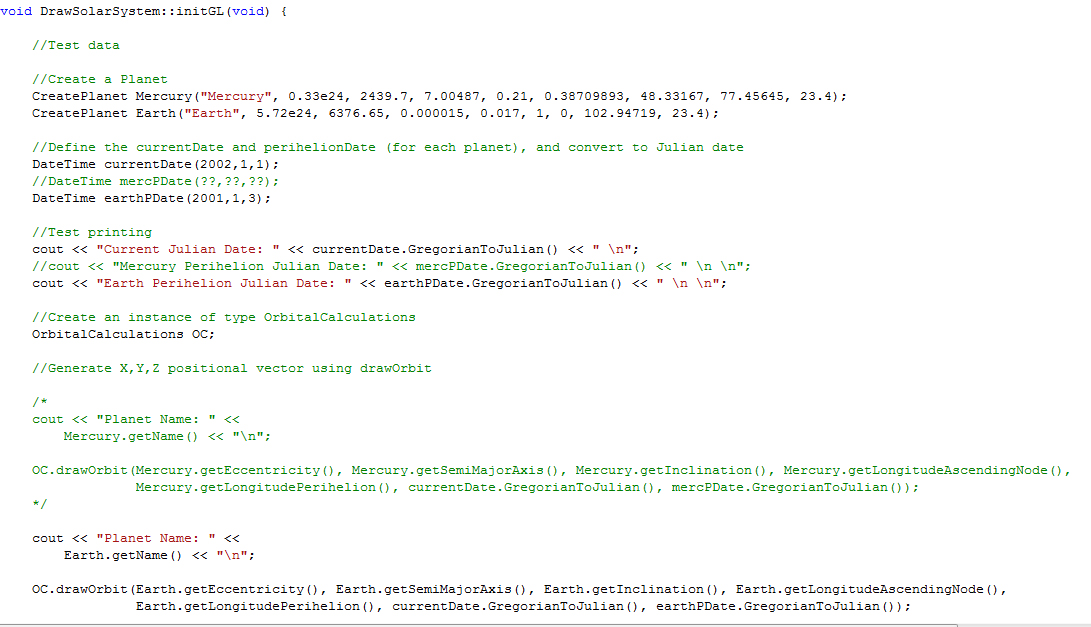
Now i was able to create a planet in the InitGL class of DrawSolarSytem, and call the drawOrbit method of OrbitalCalculations in order to check the test prints. Here are some screenshots of the method, and the resultant console print out:


As you can see, data is given out for each calculation, so it's definately doing something!

Now onto the unresolved problems. As of yet, I haven't been able to find any data to verify and compare the majority of my answers with, aside from the Julian date and obvious ones like period of orbit.

In addition, you may have noticed commented out code to test Mercury as well as the Earth. I've searched for quite some time today trying to find dates for when Mercury was at it's perihelion point, but have so far been unable to find any data. This was easily sourcable data for the Earth, but appears much harder to find for other planets, and is something I will be consulting my supervisor about.

That's pretty much it for this week, some useful links I've found and used this week to follow.

Useful Links:

Perihelion dates for the Earth - dates for when the Earth was/will be at it's perihelion point. Would be lovely to have a similar table for other planets!

http://www.met.reading.ac.uk/~ross/Documents/OrbitNotes.pdf - contains slightly different orbital elements data than the JPL source I have been using. Something to discuss with Rob?

http://www.devmaster.net/forums/showthread.php?t=5059 - How to load 3Ds max objects into OpenGL. Could be useful if my current method fails.