Showing posts with label math. Show all posts

Wednesday, 16 February 2011

Week 21 - Rotation and Menus

This week I have been working on getting the planets rotating at the correct speeds and around their axis - quite difficult! - and implementing a pop up menu system, moving over some of the functionality I had coded into the keyboard controls.

Firstly, planet rotation. The first thing I had to do was work out a way to animate the rotation - this was fairly simple, and required a glRotatef call before drawing the planet in myDrawGLScene. For example, the Earth would rotate by "earthSpin" degrees every frame as the program runs. The variable earthSpin (there is a unique Spin variable for every planet) is updated in the method planetRot, which assigned the appropriate rotation value to each variable.

In order to calculate the correct rotation values, I needed a few things - firstly, how long it takes each planet to rotate 360 degrees, which I found at this website. Secondly, I needed to calculate how many frames it took the Julian day to increase by 1 as the program ran. Since the Julian day is currently set in the program to increase by 0.05 every frame, that means that it takes 20 frames for the day to increase by 1. Using this information I was able to work out the correct rotation values for each planet - the math is explained in more detail in the comments beside the code in the following screenshots of the planetRot function (click to expand):


each value has to be multipled by speedFactor, so that the rotation increases as the speed of orbit increases.

The next major problem was rotation around the axis of the planet. Each planet had already been rotated slightly by it's axis value - these rotations were all done around the Z axis of each planet, basically rotating around a vertical axis instead of the off centre one it needed to go around. This gave me a major headache, as opengl only allows for transformations around the X, Y and Z axes. I spent many hours reading information on matrix tranformations and aligning an axis to a vector but to be honest, I didn't really understand it too well. From the information and code examples I had come across, I developed the following function:


...which didn't work. It is meant to align the axis to a given vector, but I realised that the vector I was aligning it to (the vector position of the planet) would not be at the correct axis tilt anyway, and I have no idea how to get that vector. I have kept the method in the program for now, and it is something I will need to discuss with Rob tomorrow.

The solution I have been working on since that method failed is rotating by the axis value before the planet is drawn, then correcting that afterwards, like so:


This does seem to improve the look of the planets rotation, but I'm not sure if it's correct.

Now, onto opengl menus. The creation of the menu is all handled by a method called CreateMenus() in the main.cpp file. The handling of what each menu option does is taken care of by a method called myMenuResponder(int selection)  in the DrawSolarSystem class. The menu handles:

  • Listing the keyboard controls (submenu)
  • Controlling the scale of the distance between the planets and the Sun (submenu)
  • Controlling the scale of the planets (submenu)
  • Zooming into a view for each planet (submenu)
  • Changing the view between horitzontal and vertical
  • Switching to full screen mode
  • Resetting the scene to the load up config
  • Exiting the program
Here is the CreateMenus method that shows how all these options are programmed:


The very last line tells the program to call this menu whenever the right button of the mouse is clicked - this is how the user accesses it. Here is a small section of the myMenuResponder method. Each option in the above code is given a number, which is how these two methods are linked.


And finally, a couple of screenshots that demonstrate the program in vertical / horizontal view mode, and with the pop up menu up:


Note that the planets have been increased to their maximum scales, with the outer four planet's distances also decreased to their minimum value (as close as they can get to the Sun).

That's all for this week. Hopefully I'll be able to address the axis rotation and lighting/shadow issues for next week.

Friday, 15 October 2010

Blog Week 2 - Orbits

This week I'm focusing on finding out more information about planetary orbits. Firstly I'd like to recap on some of the thoughts in the previous blog following this weeks meeting with Rob Lothian (my project supervisor);

  • Planetary bodies - due to the complex nature of getting the actual planets to orbit, creating different orbits for moons may be too much for this project. I think I'd like to include moons - at the very least for the Earth - but this is something that will need to be considered later in the project.
  • A third scale may be required for the Sun (the first being distance between the planets, and the second the size of the planets in relation to each other). This is however something that can be looked at and played around with once the basic orbital coding is done.
  • Selecting a starting date for the program will just be done using accurate data, not using any "planetary alignments", so to speak.

Now, on to this weeks work. Following the honours project talk we had midweek, I've starting producing a Mind Map. Hopefully mainting this and the blog will prove extremely useful when it comes to writing up the final report for this project.

For this weeks research on orbits, I have been using a variety of websites - applet-magic states that a planets orbit is calculated by the balance between the gravitational attraction between the planet and the Sun, and the centrefugal force from it's movement in a approximately circular orbit.
The site details that in order to calculate a planets orbit, five main points - called Lagrangian points - are needed. It goes on to explain the math behind this, although it doesn't appear to be finished. To be honest, the math goes right over my head, and it's very difficult to understand.
On the same website - http://www.applet-magic.com/orbital.htm - they have a table of orbital velocities which also includes information on the length of a year and the orbital radii of the planets, in relation to the Earth.

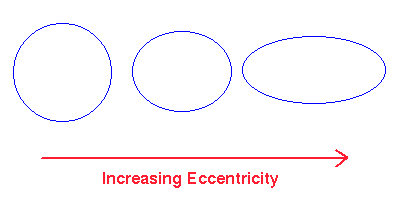
One important point to note about orbits is that they are not circular, they are elliptical, and each planet has an eccentricity value between 0 and 1 - the close to 0, the more circular the orbit, the closer to 1, the more flat.
I found a useful table documenting these values for 6 of the 8 planets:

Planet $e$
Mercury 0.206
Venus 0.007
Earth 0.017
Mars 0.093
Jupiter 0.048
Saturn 0.056


Upon further study, perhaps a better way to calculate the orbit of the planets would be to use Kepler's Law's of Planetary Motion. These are (from istp.gsfc website):

  1. Planets move around the Sun in ellipses, with the Sun at one focus
  2. The line connecting the Sun to a planet sweeps equal areas in equal times.
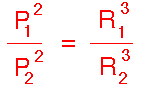
  3. The square of the orbital period of a planet is proportional to the cube (3rd power) of the mean distance from the Sun (or in other words--of the"semi-major axis" of the ellipse, half the sum of smallest and greatest distance from the Sun). Shown below (from this website):

The astro-tom website explains how Kepler's third law can be used to calculate the orbits of other planets, given certain data. The equation used is;

P (years)2 = R (A.U.s)3


Where P is the period of the planets (measured in Earth years), and R is the length of the semi major axis of the planet's orbit (measured in an astronomical unit, the average seperation of the Earth from the Sun).
The website demonstrates how the semi-major axis length of Mars can be calculated given it's orbital period.

On the istp.gsfc website, an alternate equation is given:

r = a(1 – e2)/(1 + e cos f)
 

Where a is the length of the planet's semi major axis, e is the eccentricity value and the polar coordinates are (r,f).

Overall, I'm pretty confused about which equations I should be using, and even how to implement them, so this is definately something I will need to discuss with Rob.

Interesting links

http://dunnbypaul.net/ssdisckit/ -  a complex digital orrery. Contains useful references.

http://cfa165.harvard.edu/software/catalogs/sao.html - Star catalog, lots of information on many stars.

http://www.exploratorium.edu/ronh/solar_system/ - Scaling calculator - calculates planet sizes and orbits given a scaled size of Sun. Contains a link to given scaled sizes of moons and various other satellites too.

http://www.burtleburtle.net/bob/physics/solar.html#ref - small digital orrery, lots of useful references