Showing posts with label orbit. Show all posts

Wednesday, 16 February 2011

Week 21 - Rotation and Menus

This week I have been working on getting the planets rotating at the correct speeds and around their axis - quite difficult! - and implementing a pop up menu system, moving over some of the functionality I had coded into the keyboard controls.

Firstly, planet rotation. The first thing I had to do was work out a way to animate the rotation - this was fairly simple, and required a glRotatef call before drawing the planet in myDrawGLScene. For example, the Earth would rotate by "earthSpin" degrees every frame as the program runs. The variable earthSpin (there is a unique Spin variable for every planet) is updated in the method planetRot, which assigned the appropriate rotation value to each variable.

In order to calculate the correct rotation values, I needed a few things - firstly, how long it takes each planet to rotate 360 degrees, which I found at this website. Secondly, I needed to calculate how many frames it took the Julian day to increase by 1 as the program ran. Since the Julian day is currently set in the program to increase by 0.05 every frame, that means that it takes 20 frames for the day to increase by 1. Using this information I was able to work out the correct rotation values for each planet - the math is explained in more detail in the comments beside the code in the following screenshots of the planetRot function (click to expand):


each value has to be multipled by speedFactor, so that the rotation increases as the speed of orbit increases.

The next major problem was rotation around the axis of the planet. Each planet had already been rotated slightly by it's axis value - these rotations were all done around the Z axis of each planet, basically rotating around a vertical axis instead of the off centre one it needed to go around. This gave me a major headache, as opengl only allows for transformations around the X, Y and Z axes. I spent many hours reading information on matrix tranformations and aligning an axis to a vector but to be honest, I didn't really understand it too well. From the information and code examples I had come across, I developed the following function:


...which didn't work. It is meant to align the axis to a given vector, but I realised that the vector I was aligning it to (the vector position of the planet) would not be at the correct axis tilt anyway, and I have no idea how to get that vector. I have kept the method in the program for now, and it is something I will need to discuss with Rob tomorrow.

The solution I have been working on since that method failed is rotating by the axis value before the planet is drawn, then correcting that afterwards, like so:


This does seem to improve the look of the planets rotation, but I'm not sure if it's correct.

Now, onto opengl menus. The creation of the menu is all handled by a method called CreateMenus() in the main.cpp file. The handling of what each menu option does is taken care of by a method called myMenuResponder(int selection)  in the DrawSolarSystem class. The menu handles:

  • Listing the keyboard controls (submenu)
  • Controlling the scale of the distance between the planets and the Sun (submenu)
  • Controlling the scale of the planets (submenu)
  • Zooming into a view for each planet (submenu)
  • Changing the view between horitzontal and vertical
  • Switching to full screen mode
  • Resetting the scene to the load up config
  • Exiting the program
Here is the CreateMenus method that shows how all these options are programmed:


The very last line tells the program to call this menu whenever the right button of the mouse is clicked - this is how the user accesses it. Here is a small section of the myMenuResponder method. Each option in the above code is given a number, which is how these two methods are linked.


And finally, a couple of screenshots that demonstrate the program in vertical / horizontal view mode, and with the pop up menu up:


Note that the planets have been increased to their maximum scales, with the outer four planet's distances also decreased to their minimum value (as close as they can get to the Sun).

That's all for this week. Hopefully I'll be able to address the axis rotation and lighting/shadow issues for next week.

Wednesday, 9 February 2011

Week 20 - User Interaction

Following a short break, it's back to work on the Honours Project. I'm aiming to have the program fully finished by the end of February, the features I'm aiming to improve/add are:

  • More user interaction. This has been partly addressed this week.
  • Improve lighting and shadows. Currently the planets don't have a 'dark side' where the Suns light doesn't hit them. I've no idea why this is as the lights are set up in the centre of the Sun, so I may not be able to solve this.
  • Implement pop up menus. All the user interaction is keyboard and mouse based at the moment, and there's too many functions going on to have them all implemented by a key press - I want to move some stuff over to menus, and also include a pop up with control details for the keyboard functions.
  • Rotate planets as they orbit. Currently the planets aren't rotating as they move, and implementing this has proved more difficult than I first thought it would be.
  • Improve movement controls. This is the least important update, so it may get cast aside if I run out of time, but I would like to improve the way the user moves around the 3D solar system - it's not brilliant but it works, so I wouldn't be too worried about leaving it if need be.

So onto the improvements in the user interaction that have been added this week. The major cosmetic change is the addition of a speed control. I had previously attempted to add this in using a variable called speedFactor which was adjusted everytime the user pressed a key - but could not get it to work. I solved this by moving the code which updates the julian date:


   julDate += (0.1 * speedFactor);

from the updateMercPosition function that it was in, into the main myDrawGLScene method, which fixed the issue of the speedFactor variable not being updated by a user key press. Now whenever the user presses 'm' the speed is increased (to a maximum of 25x), with n decreasing the speed (minimum of 1x). The program launches in 1x speed, and can be increased by the user to 25 times the launch speed. The speed is displayed on screen, beneath the two date displays like so:


The second piece of functionality that has been added is the ability for the user to increase the size of the individual planets. This was something discussed in my last meeting with Rob, and I decided that in order for the user to get a good look at the models (especially the smaller inner four planets) without lots of zooming and panning, this would be a great feature to implement. At the moment, only the planet Earth has this fucntionality coded, and it is controlled by the 'u' (to increase size to a max of 8x the original) and 'i' (to decrease size) keys. This is a feature I intend to move to the menu system, simply for the reason that I will run out of keyboard keys if I use two per planet. In order to code this, I introduced a variable earthSize, which is controlled in a similar way to the speed variable, increasing or decreasing the variable on a key press. I had to move the scaling function for the model from InitGL, where it was located in the display list, into myDrawGLScene, in order for it to update correctly whilst the program is running.


The final piece of functionality that I added this week was scaling the distances from the Sun. There are two options for the user in this case - they can increase/decrease the distance of the inner four planets from the Sun (currently using the 'f' and 'g' keys) or increase/decrease the distance of the outer four planets from the Sun. This gives the user the option to see the planets bunched in much more closely than the correct scale that the program launches in. This is controlled by two variables - innerScale and outerScale, with a default setting of 16 (purely for aesthetic reasons, although this could change). The positions of the planets that are defined in earth Update..Position method are multiplied by these variables, which are increased or decreased by a key press. The increase value for both variables is limited to 20, whilst different limits are applied for the inner and outer decrease values - in the inner case, so Mercury does not disappear into the Sun model, and in the outer case, so Jupiter and Mars' orbits don't collide.
The image below shows the outer planets decreased to their lower limit, Jupiter appearing very close to the inner four planets.


That's all for this week.

Monday, 22 November 2010

Week 7 - More Programming

This week I have been working further upon the OrbitalCalculations class - namely, trying to prove that the figures being generated are correct by following through an example from a trustworthy source. The source I used was the following from Utrecht University - http://www.astro.uu.nl/~strous/AA/en/reken/hemelpositie. In getting this result, I have edited the class quite a bit, and will detail those changes later. I have also worked on getting a proper import code, that will allow my program to read in 3Ds max models and their materials.

Firstly, the changes to the orbital calculations class;

  • getV has been replaced with getTrueAnomaly, and the variables likewise - so double v is now double trueAnomaly. This was mainly to help myself, I had not realised initially that the variable v that I was calculating was the true anomaly. I also changed the code, to give a more accurate result. I adapted the code from the same resource as the eccentric anomaly code - http://www.jgiesen.de/kepler/kepler.html.
  • variable perihelionTime has been removed. After discussions with Rob it became clear that the current method of calculating the mean anomaly could not work, as there was very little to no data available on the date of perihelion passage for any planet other than Earth. The new method requires a start time which the orbital elements are valid for (01/01/2000) and the current date.
  • Using the method of calculation detailed in the Utrecht University website, it is no longer necessary to calculate the X,Y,Z values in two parts, so x1, y1, z1, x2, y2, z2 and their associated methods have been removed and merged into one for calculating x, y and z on their own.

Now onto the big problem I had in getting the numbers my program output to equal the ones that website said I should be getting - radians and degrees. You see, the computer computes sin/cos/tan functions in radians, and the data I input and want output is in degrees. This gave me quite some trouble, but essentially each variable which is an angle had to be converted into radians before the calculation is carried out, then converted back into degrees if it is returning an angle. What I did was create a variable called k, and make it equal to Pi / 180. This means that multiplying an angle by k will convert it from degrees to radians, and dividing an angle by k will convert an angle from radians to degrees.

I'd like to run through the example on the Utrecht University website for calculating the X,Y,Z position of Jupiter. 

The first step is to calculate the mean anomaly. Here is a screenshot of my new mean anomaly calculation:


The UU website states the result should be: 141.324°

Next, the true anomaly. Here's my new code to calculate the true anomaly:

The result for the true anomaly should be: 144.637°

Next up, the distance to the sun, which is r. My code to calculate r hasn't changed actually, but I did have to convert the true anomaly used in the calculation into radians first.

The result for r should be: 5.40406 AU

Finally, the x,y,z coordinates. I'll post an image of my code to calculate X, the other two are similar. Notice that each angle has to be multiplied by k - this is not shown on the website, and gave me lots of trouble!


The x,y,z coordinates for Jupiter should be: −5.04289, 1.93965, 0.10478

Now, here's a screenshot of my results:


and a side by side comparison. Target results in red, my results in blue.

Mean Anomaly: 141.324° | 141.365°
True Anomaly: 144.637° | 144.036°
r: 5.40406 | 5.40417
x: −5.04289 | -5.04431
y: 1.93965 | 1.93624
z: 0.10478 | 0.104829

Pretty close! I'm very happy with how the calculations are working. 

The second part of what I was working on this week was importing a basic model from 3Ds Max and getting it displayed on screen. This proved quite difficult! The code I was planning to use from last semester proved instantly unusable - it requires models to be of .txt format, and 3Ds Max does not export to this format.

I spent many hours trying and testing different loaders, and eventually settled on an object loader (it loads models of type .obj) called GLM from this website: http://www.3dcodingtutorial.com/Working-with-3D-models/Getting-GLM.html. I imported the files into my project and put them in a seperate folder - this means that the ImportModel and point classes I had made are no longer needed. 

With a bit of tweaking, I've managed to get a geosphere with a material of an alien's face that I created in 3Ds Max, to display in my viewport window. Here's a screenshot:


All in all, some good progress made. 

More next week.

Saturday, 13 November 2010

Week 6 - Initial Coding - Orbital Calculations

Coding has begun! This week I have set up the initial class framework in visual studio (I have switched to visual studio 2008 as this is what is used in the University labs, in case anything happens to my laptop), and begun programming the orbital calculations class.

Firstly I'd like to mention some initial problems I have come across and what I have done to fix them, and changes I have had to make to the UML plan.

In the CreatePlanet class, i have added longitudeAscendingNode and longitudePerihelion as private instance variables (doubles). This was an oversight, as these values are required in the calculations for x1, y1 and z1. I have also removed periodOfOrbit as a variable in CreatePlanet, and moved it to the OrbitalCalculations class. I found it was easier to calculate the period of orbit using the semi-major axis, instead of hard code in a value for each planet.

The bulk of changes has occured in the OrbitalCalculations class. Firstly, meanAnomaly has been added as a private instance variable. I'm not sure why I left this out, but the variable is required to calculate the mean anomaly in the drawOrbit method. Secondly, I found I had neglected to consider the need of parameters in the majority of the methods. This was a mistake as of course most of the calculations utilise data which will, in the end, be taken from the created planets. These changes are as follows:


As you can see from the image, I have also renamed the vector class to Vector3D. I was a bit worried about vector being a reserved C++ word, so changed it to be on the safe side. Another change is to make the drawOrbit method Vector3D, instead of void. This simply means that the method returns the coordinates in vector form, instead of having another method to do this.

One of the major issues I knew I would have is calculating the eccentric anomaly. I tried out a few iteration methods that didn't work, but managed to find C# iteration code on this website: http://www.jgiesen.de/kepler/kepler.html. I adapated this code into C++, and tested it to give the same results as the calculator on that website. A screenshot of this method is below:


The final drawOrbit method utilises all the previous methods in the class to calculate the final x,y,z coordinates, here is a screenshot of this method:


I have also included test printing in this method, which will print the various stages to the console when the method is called in DrawSolarSystem. I had an issue with printf, the printing mechanism I have previously used in C++, and so decided to use cout as my test printing method throughout the program.

I had one final major oversight at this stage, which became apparent when I went to create the planet and test the drawOrbit method in DrawSolarSystem. The mean anomaly calculation requires a current time and a time since the planet was last at the perihelion point to be defined - what format was that in? I hadn't previously considered this fully. With some research, I discovered that astronomers use the Julian dating system (defintion), and thus my program would have to have some system of converting standard (Gregorian) dates into Julian dates. What I did was to add another class, called DateTime. In this class a date with a year, month and day can be defined, then a method called to convert it into a Julian date. It also has a method to convert a Julian date back into a Gregorian date, should it be necessary. The calculations for these methods were adapted from the following website: http://www.usno.navy.mil/USNO/astronomical-applications/astronomical-information-center/julian-date-form. I also used this website which calculates Julian dates to confirm that the method works correcetly. A screenshot of the class is below:


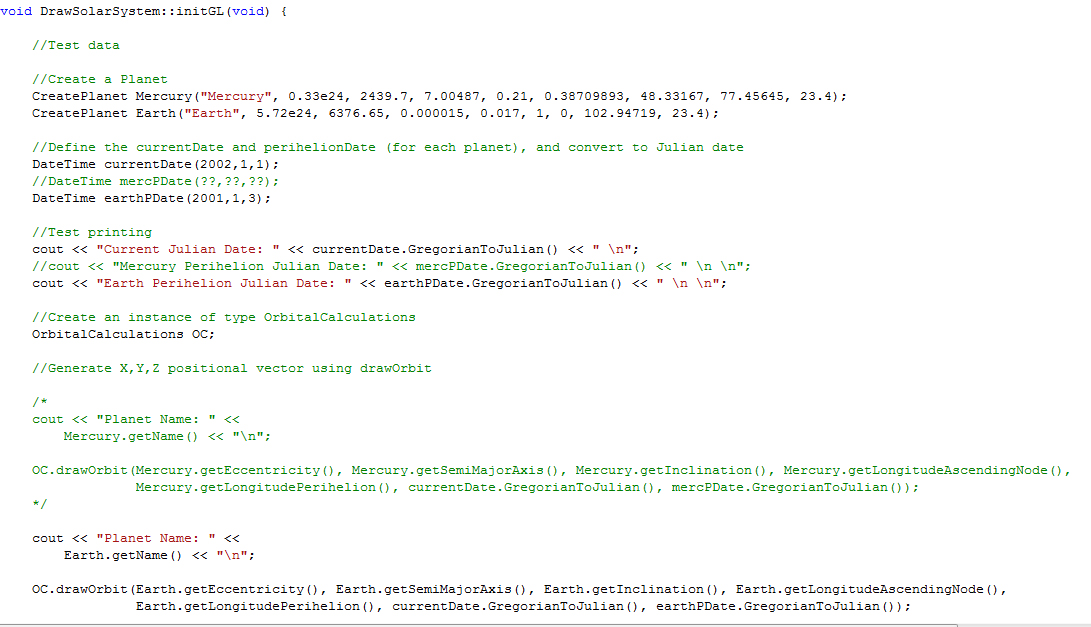
Now i was able to create a planet in the InitGL class of DrawSolarSytem, and call the drawOrbit method of OrbitalCalculations in order to check the test prints. Here are some screenshots of the method, and the resultant console print out:


As you can see, data is given out for each calculation, so it's definately doing something!

Now onto the unresolved problems. As of yet, I haven't been able to find any data to verify and compare the majority of my answers with, aside from the Julian date and obvious ones like period of orbit.

In addition, you may have noticed commented out code to test Mercury as well as the Earth. I've searched for quite some time today trying to find dates for when Mercury was at it's perihelion point, but have so far been unable to find any data. This was easily sourcable data for the Earth, but appears much harder to find for other planets, and is something I will be consulting my supervisor about.

That's pretty much it for this week, some useful links I've found and used this week to follow.

Useful Links:

Perihelion dates for the Earth - dates for when the Earth was/will be at it's perihelion point. Would be lovely to have a similar table for other planets!

http://www.met.reading.ac.uk/~ross/Documents/OrbitNotes.pdf - contains slightly different orbital elements data than the JPL source I have been using. Something to discuss with Rob?

http://www.devmaster.net/forums/showthread.php?t=5059 - How to load 3Ds max objects into OpenGL. Could be useful if my current method fails.